

The Coach Lounge
Five tools in one, and you never pay for any of them. Film, search, pipeline, directories, and endorsements in a single workspace.
Featured Athletes
Four athletes from our board, one from each class, refreshed every few days. Tap any of them to see exactly what a college coach sees when they open a page here.
Loading today’s key…
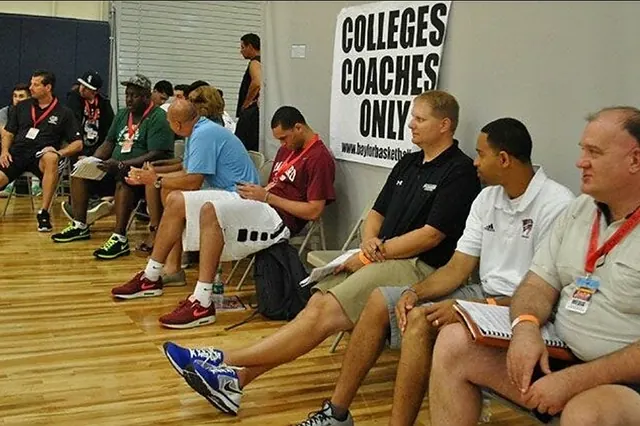 The evaluation room, where the work actually happens
Find exactly who you need
What replaces what
Every tool below exists somewhere else behind a subscription. Here they are together, free.
Layered Search
Sport, class, position, state, core GPA, interest, and film status stacked in one query across six graduating classes.
Watch Lists & Pipeline
Save athletes, add private notes, move them through stages. A recruiting CRM without the enterprise weight.
Film In Context
Highlights sit next to academics, stats, and contact, not in a separate tab in a separate product.
High School Directory
Rosters, coaching staff, athletic directors, and schedules for every school. Built to mirror the college side exactly.
College Directory
Staff, recruiting coordinators, compliance, admissions, and aid. Claim and correct your own entry.
Coach Clipboard
Your roster, your staff, your notes, on your phone. Set your program up here once and it unlocks the rest.
Live Stat Room
One tap per play, position by position, five sports. Works with no signal in the stadium and syncs later. Game stats stack into season totals on each player’s profile.
Live Scouting Grid
Filter Friday's games by how many watch listed athletes are playing. Cover four prospects in one night.
Get more out of it
Four things the coaches who get the most from this platform do differently.
Tap any guide to open it.
Guide 01Build a search that finds sleepers
The best value in recruiting is the athlete with real film and a real transcript who nobody has ranked yet. They exist in volume, and almost nobody filters for them.
Start with the filters most people skip. Set a core GPA floor, require film, and require a transcript on file. That combination alone removes most of the noise, because an athlete who has done all three is serious.
Widen the geography, not the standards. Most programs search their own state first and fight over the same forty names. Two states over, the same profile is uncontested.
Work the classes nobody is on yet. Everyone is looking at 2027. The 2029 and 2030 classes are wide open, and those athletes remember who found them first.
Save the search. Athletes matching it keep arriving, and you see them before anyone else.
Guide 02Post needs that actually get answered
Programs that publish specific position and class needs get far more qualified inbound than programs that post nothing. Specificity is the entire trick.
Name the position and the class year. "Two offensive linemen, 2028" tells an athlete whether to write to you. "Always recruiting" tells them nothing, and they write anyway.
Publish an academic floor. A minimum core GPA saves you reading fifty applications you were never going to take, and saves the athlete a rejection.
Say what you actually value in one line. A coach who writes "we recruit length and motor over polish" gets exactly that in the inbox.
Update after signing day. Stale needs are worse than none, because they waste the time of the athletes most likely to trust you.
Guide 03Contact rules that keep you clean
Recruiting calendars, dead periods, and contact windows differ by sport and division, and the penalties land on the program, not the athlete.
Our contact flow keeps you compliant by default. Any expression of interest in an athlete under 18 routes through their parent or guardian. There is no direct private channel between an adult and a minor on this platform, by design rather than by policy.
What that means practically: viewing profiles, saving athletes, taking notes, and posting needs are not contact and carry no window. Reaching out is what the calendar governs, and our routing keeps a record of it.
When in doubt, ask your compliance officer, not another coach. Compliance contacts are listed on every college page for exactly this reason.
Guide 04Scout live using the schedule grid
The schedules page carries every high school game in the launch states, and counts how many of your watch listed athletes are playing in each one.
Sort a Friday by watch list count. One game with four of your athletes beats four separate trips, and you see them against each other.
Filter by sport and state to plan a whole weekend instead of a single night.
Add athletes to your watch list before you go, not after. The count is what makes the grid useful, and it only works if the list is current.
Write your notes the same night. Three schools later, every evaluation blends together.
Recruit while you sleep
Post your roster needs once. Athletes who fit find you, add your program to their top colleges list, and you see it happen.
Your Program Page
Division, conference, location, and a verified badge
Post Roster Needs
By position and graduating class, so the right athletes self select instead of flooding your inbox.
Set Your Academic Target
Minimum core GPA and test range, so families know before they write.
Loading today’s tip…
Why is this free for coaches?
Because a recruiting platform without coaches is a filing cabinet. Your presence is what makes a profile worth building, so charging you would break the only thing that matters.
Families support the platform through an optional premium tier and through programs their schools and districts choose to run. You are never a line item.
Coach account includes
The rooms this platform was built inside
 Official visits
 Evaluation rooms
 Combine settings
 Training facilities
This week across the networks
Free to read, and every card links straight to the source. A rotating look at what MaxPreps, 247Sports, On3, Rivals and ESPN are covering right now.
Headlines and links belong to their networks. Keys to the Journey is free and sends readers to them. Local journalist? Feature your stories →

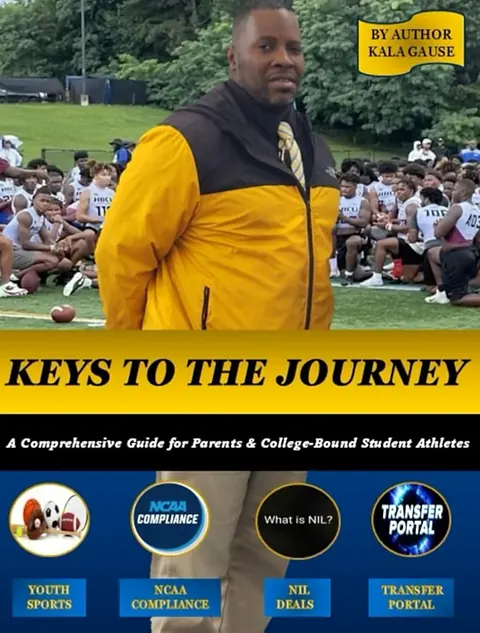
Two books. One journey. This whole site is them in practice.
Soar High, Dream Big helps the younger ones find their why. Keys to the Journey turns it into a plan: the five keys, eligibility, recruiting, and balance. Every tool here, from the Balance Center to the Prospect Page, comes from those pages.